

Top 10 Keyboards for Kids to Learn Touch Typing

Top 10 Keyboards for Kids to Learn Touch Typing

Top 10 Keyboards for Kids to Learn Touch Typing showcases a selection of keyboards designed to make mastering typing skills both fun and effective for young learners. Featuring colorful layouts, educational tools, and durable construction, these keyboards are tailored to help children learn touch typing with ease and enjoyment. Whether it’s engaging features or sturdy designs, these options provide the perfect balance of functionality and fun to support kids on their typing journey.
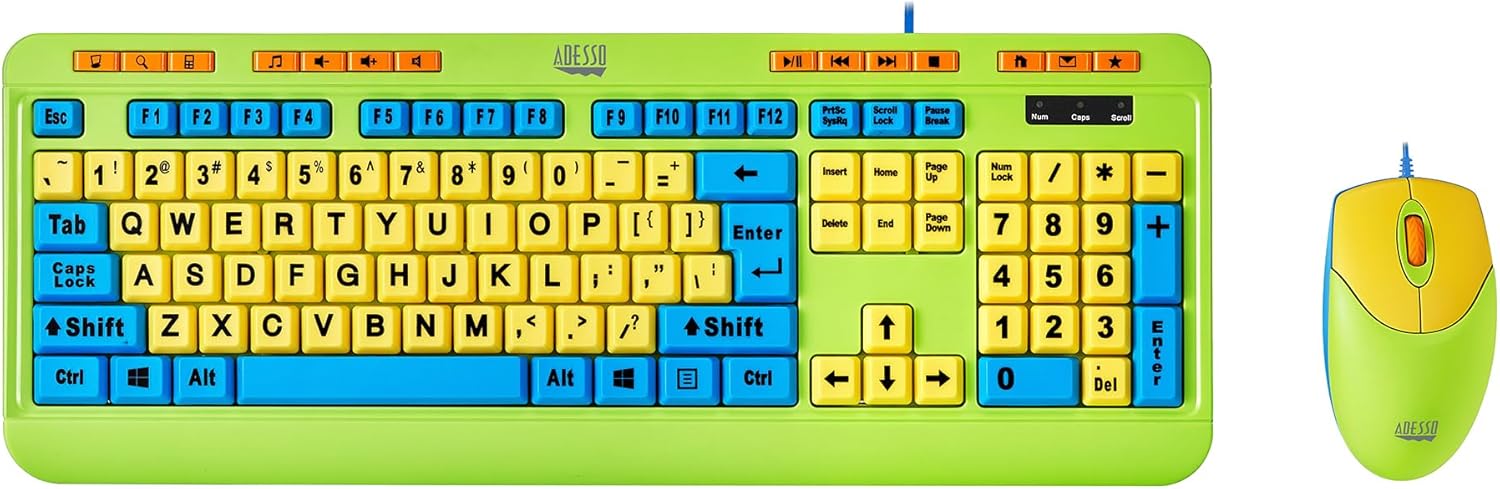
Here’s a quick guide to our curated list of the Top 10 Keyboards for Kids to Learn Touch Typing.

    1. Playlearn Children’s Computer USB Keyboard
    2. Practice Typing with Learn to Type Keyboard
    3. Adesso Kids Keyboard and Mouse Combo
    4. Learning Typing Keyboard Pop Fidget Toy
    5. Full Size Large Print Wireless Keyboard and Mouse
    6. AbleNet KinderBoard USB Wired Keyboard
    7. Urby Waterproof Roll-Out Keyboard
    8. Pink Wireless Bluetooth Keyboard
    9. Clevy Kids Computer Keyboard
    10. SABLUTE Large Print Backlit Keyboard

Let’s dive into the detailed pros and cons of each option from our top 10 keyboards for kids to learn touch typing.

Related Posts: 

  1. Top 10 The Best Mechanical Keyboards
  2. Top 10 Large Print USB Keyboards
  3. Top 5 Colorful Keyboards

1. Playlearn Children's Computer USB Keyboard

Playlearn Keyboard – Features color-coded upper and lower case keys for easy recognition. Its splash-proof design ensures durability for young learners.

Pros

  • Color-coded keys for easy letter recognition
  • Splash-proof design for durability
  • Fun, vibrant layout makes learning engaging

Cons

  • USB-only connection limits compatibility with some devices
  • Smaller size might be difficult for older children or adults to use

2. Practice Typing with Learn to Type Keyboard

Learn to Type Keyboard – Shine-through keycaps offer visual guidance, with a mechanical design enhancing tactile typing feedback.

Pros

  • Shine-through keycaps provide visual feedback for learning
  • Mechanical design ensures tactile feedback
  • Distraction-free layout supports focus on learning

Cons

  • Lack of color coding may not be as beginner-friendly for younger children
  • Mechanical keyboard may not appeal to all users due to its noise

3. Adesso Kids Keyboard and Mouse Combo

Adesso Combo – Includes large, colorful keys and a 1000 DPI wireless mouse for precise navigation and engaging learning.

Pros

  • Large 4X size print keys are easy to read
  • Includes a 1000 DPI optical wireless mouse for better precision
  • Multimedia controls enhance learning with educational content

Cons

  • Wired connection limits portability
  • Slightly bulky for children with smaller hands

4. Learning Typing Keyboard Pop Fidget Toy

Pop Fidget Keyboard – Combines sensory feedback with typing practice in a portable, colorful design perfect for kids.

Pros

  • Sensory feedback from pop bubbles makes typing fun
  • Compact and portable for on-the-go practice
  • Develops fine motor skills while reinforcing typing practice

Cons

  • Limited typing function compared to standard keyboards
  • Smaller size might not be comfortable for older children

5. Full Size Large Print Wireless Keyboard and Mouse

Large Print Wireless Keyboard – Oversized, easy-to-read keys with an ergonomic design for comfort during long sessions.

Pros

  • Large print keys are ideal for visually impaired kid
  • Quiet, smooth typing experience
  • Ergonomic design with wrist rest for comfort

Cons

  • Larger size might be cumbersome for younger kids
  • Wireless connection could experience interference in crowded environments

6. AbleNet KinderBoard USB Wired Keyboard

AbleNet KinderBoard – Large, color-coded keys simplify typing for young children or those with motor challenges.

Pros

  • Large, color-coded keys ideal for young learners
  • Sturdy and durable construction
  • Plug-and-play setup for easy use

Cons

  • Wired connection limits flexibility and portability
  • The design may be too simplistic for older children

7. Urby Waterproof Roll-Out Keyboard

Urby Roll-Out Keyboard – Waterproof and flexible, ideal for portability and easy cleaning after spills or messes.

Pros

  • Flexible, rollable design makes it easy to store and transport
  • Waterproof, dustproof, and spill-resistant for mess-prone kids
  • Universal compatibility with a variety of devices

Cons

  • Silicone material may feel less responsive for some users
  • Small size may not be comfortable for long typing sessions

8. Pink Wireless Bluetooth Keyboard

Pink Bluetooth Keyboard – Retro typewriter-style keys with multi-device Bluetooth connectivity for versatility.

Pros

  • Multi-device connectivity allows seamless switching between devices
  • Retro typewriter-style keys are visually appealing
  • Compact and lightweight for easy portability

Cons

  • Limited compatibility with non-Bluetooth devices
  • The round keys may be hard for small fingers to press accurately

9. Clevy Kids Computer Keyboard

Clevy Keyboard – Spill-proof construction with bright, easy-to-read fonts designed for early learners.

Pros

  • Spill-proof design offers extra protection against accidents
  • Easy-to-learn font for young learners
  • Durable construction for long-lasting use

Cons

  • Limited to basic functions; not ideal for advanced typing tasks
  • May not be suitable for older children who need a more complex keyboard

10. SABLUTE Large Print Backlit Keyboard

SABLUTE Backlit Keyboard – Large-print keys and customizable 7-color backlighting for visibility in any setting.

Pros

  • Backlighting can be distracting for some users
  • Larger size may not be ideal for smaller desks or children with limited space

Cons

  • Awful key feedback
  • Not all that much ergo
  • Fixed split configuration

Conclusion

In conclusion, choosing the right keyboard for your child can make a significant difference in their learning journey. The Top 10 Keyboards for Kids to Learn Touch Typing offer a variety of options tailored to different needs, from colorful layouts and sensory feedback to durable, spill-proof designs and advanced features. Whether you’re looking to improve your child’s typing skills, enhance their computer literacy, or simply provide them with a fun and engaging tool, these keyboards combine functionality, education, and durability to support their growth.

For quick reference, here are the keyboards from our list: the Playlearn Keyboard, featuring color-coded keys with a splash-proof casing; the Learn to Type Keyboard, offering shine-through keycaps for effective typing practice; and the Adesso Combo, which combines a vibrant keyboard with a 1000 DPI mouse. The Pop Fidget Keyboard stands out with its sensory feedback and typing skill reinforcement, while the Large Print Wireless Keyboard features oversized keys for better visibility. The AbleNet KinderBoard is designed with large, color-coded keys for young learners, and the Urby Roll-Out Keyboard impresses with its flexible, waterproof, and portable design. The Pink Bluetooth Keyboard brings a retro-style layout with multi-device connectivity, while the Clevy Keyboard offers a spill-proof, engaging experience for early education. Finally, the SABLUTE Backlit Keyboard features large-font, backlit keys, perfect for low-light environments.

Pick the one that best suits your child’s needs and watch them develop their typing skills with ease and fun!

0 0 votes
Article Rating
Subscribe
Notify of
guest
0 Comments
Oldest
Newest Most Voted
Inline Feedbacks
View all comments